

sudo Access for claude
May 2026
I administer several Linux desktop and server machines, and it's been useful to let claude handle administration tasks for me.
I don't want to run claude as root, but I also quickly got tired of the dance where claude tells me a command to run, I run it in a separate tmux pane, and then I paste the output back to claude.
claude cannot on its own invoke sudo: by default, sudo reads the password prompt from /dev/tty, but claude runs its subprocesses without a controlling terminal, so there's nowhere for the prompt to go.
There's been an issue open about it for about 6 months.
What to do in the meantime?
One solution is to set the SUDO_ASKPASS environment variable, which points to a program that either (1) knows the password and can simply enter it or (2) opens a non-pty GUI prompt where you can enter a password.
There's a nice writeup of the GUI-prompt approach using zenity or kdialog in the issue thread, and secure-askpass takes this further by encrypting the password with your SSH key.
My systems use sudo-rs, which recently added support for this workflow.
However, I'm usually in need of this kind of sudo access on a remote machine that I SSH into, so a GUI prompt is not an option for me.
Neither am I comfortable putting my password into a file.
Another approach: sudo already has a mechanism for caching your authorization and not prompting you again.
Usually, this cached authorization is per-tty: if you run sudo twice in the same terminal, you'll only have to authenticate the first time, and the second time is free if it's within sudo's cache window (usually 5 minutes).
When claude runs subcommands, they're always in a new PTY, so they won't inherit your cached authorization.
sudo has a global mode (timestamp_type=global), where if you authorize a sudo once in any terminal, you can then use it without a second password prompt in any other terminal.
I like this mode, but I didn't want to make it persistent.
A sudo password prompt is a good safety barrier, and also adds a layer of defense-in-depth.
An attacker who gains access to my account won't necessarily also get root on the machine unless they also have my password.
Idea: what if I could grant global access only while I'm using claude for sudo tasks, and then automatically revoke it when I'm done?
The end result is this script, which I keep as claude-sudo in my ~/bin (which is in my $PATH):
When I realize that a claude session needs sudo access, I'll CTRL-D it and then re-start with claude-sudo --resume.
This puts a little indicator into my tmux status bar, just to help me remember to kill it when I'm done with it:
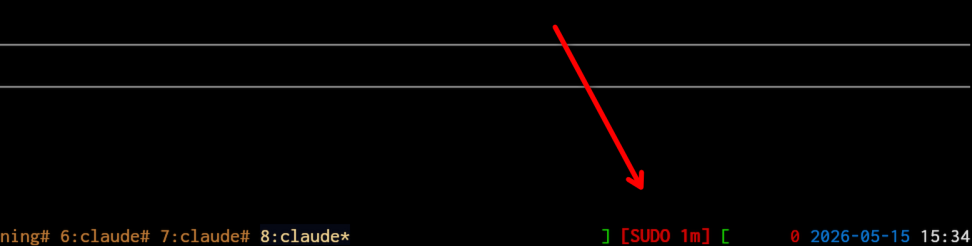
This depends on a little tmux config section here:
set -g status-left '#[fg=red]#H#[fg=green]:#[fg=white]#S #[fg=green]][#[default] #[fg=cyan]#{p30:#{=-30:#{s|$HOME|~|:pane_current_path}}}#[fg=green] ][#[default] '
set -g status-right '#(~/bin/claude-sudo indicator)#{prefix_highlight} #[fg=red]#P #[fg=blue]%Y-%m-%d #[fg=white]%H:%M#[default]'
So long as that claude-sudo process is running, any process running as me can invoke sudo with no password prompt, so I try to quickly exit when I'm done with my task.
After I wrote this, I noticed someone else in the same issue thread converged on the same timestamp_type=global trick but driven via a PreToolUse hook instead of a wrapper script.
Worth a look if you'd rather have claude prompt you to authenticate on demand rather than pre-authorizing a session.
Hope this script is useful for you!